Touch Screen Kiosks in India: A Buyer’s Guide for Businesses and Public Spaces
Self-service technology has changed the way businesses and public institutions manage visitor interactions, customer transactions, and information delivery. A touch screen kiosk brings these functions into a single, unattended terminal that operates around the clock without dedicated staff, reducing queues, improving service consistency, and freeing human resources for higher-value tasks. For businesses evaluating kiosk solutions in India, understanding the types available, the features that matter, and how to select from the range of kiosk manufacturers in India is the starting point for a successful deployment.
What Is an Interactive Touch Screen Kiosk?
An interactive kiosk is a self-contained unit combining a touch-enabled display, a processing unit, and optional peripherals such as printers, card readers, cameras, and payment terminals. Users interact directly with the screen to navigate menus, complete transactions, retrieve information, or submit forms, without requiring assistance from staff.
The term covers a wide range of form factors and applications. A touch screen kiosk in a retail environment may handle product enquiries and self-checkout. In a hospital, it manages patient registration and appointment confirmation. In a government office, it issues tokens and displays queue status. In an exhibition or showroom, it delivers interactive product demonstrations. The hardware platform is broadly similar across applications; what differs is the software, the peripheral configuration, and the enclosure design.
Types of Touch Screen Kiosks
Freestanding floor kiosks are the most versatile configuration, suitable for open areas in retail stores, banks, airports, hospitals, and government facilities. The enclosure houses all components and provides a stable, self-supporting structure that can be positioned anywhere a power and network connection is available.
Wall-mounted kiosks are installed flush or semi-flush against a wall, making these suitable for corridors, reception areas, and any location where floor space is at a premium. The recessed installation also provides a degree of protection against accidental impact.
Countertop kiosks are compact units designed for placement on a service counter or desk. Common in banking, retail, and food service environments where the interaction takes place across a counter rather than in an open space.
Outdoor kiosks are weatherproofed enclosures rated for outdoor installation, with displays designed for high ambient light conditions and enclosures that protect the internal components against dust, rain, and temperature variation. These are used for parking management, public information, ticketing, and wayfinding in outdoor settings.
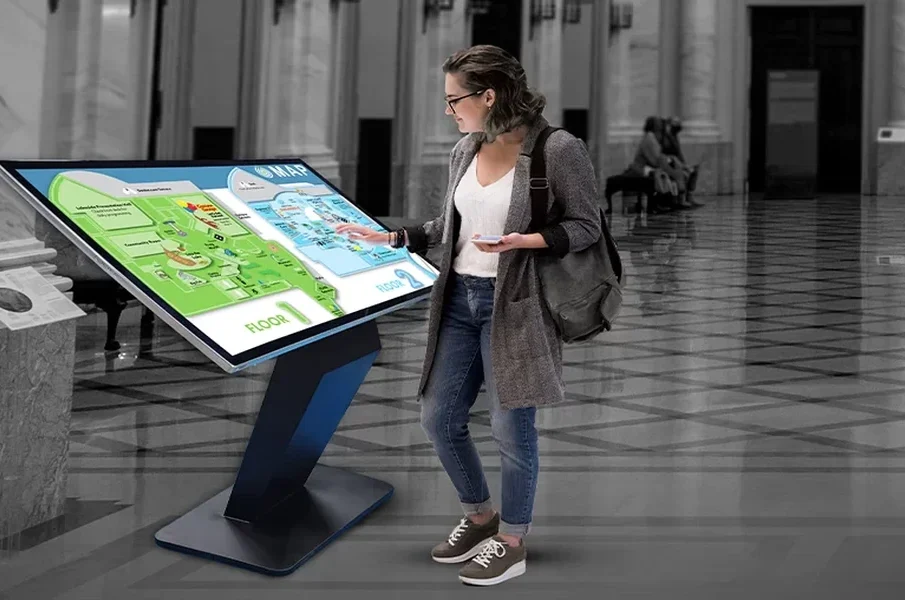
Wayfinding kiosks are specifically designed to display maps, directories, and navigation guidance in large buildings such as hospitals, universities, shopping centres, and corporate campuses.
Key Features to Evaluate in a Touch Screen Kiosk
Display size and type should match the viewing distance and interaction context. A wayfinding or information kiosk in a large open area benefits from a larger display of 43 to 55 inches or more. A transaction kiosk used at close range for form completion or payment is typically more effective at 21 to 27 inches. Display brightness is critical for outdoor and high-ambient-light indoor installations, with a minimum of 2,500 nits recommended for outdoor readability.
Touch technology determines the accuracy, responsiveness, and durability of the interaction surface. Projected Capacitive (PCAP) touch panels, the same technology used in modern smartphones, offer multi-touch support, high accuracy, and good performance with lightly gloved hands. Infrared touch panels are suitable for larger displays and can be operated with a stylus or gloved hands. The appropriate technology depends on the use case and the expected user population.
Peripheral integration capability defines what the kiosk can do beyond information display. A kiosk that needs to issue printed receipts or tickets requires a thermal printer. One that processes card payments requires a certified payment terminal. Face recognition or camera-based verification requires an integrated camera. Identifying all the functions the kiosk must perform before specifying the hardware ensures that the selected platform can accommodate the required peripherals.
Connectivity options include wired Ethernet for reliable, high-bandwidth connections in fixed installations, and Wi-Fi for deployments where cabling is impractical. 4G LTE connectivity is available for kiosks in locations without fixed network infrastructure. Remote management capability , the ability to monitor, update, and troubleshoot kiosks without a physical site visit , is an important operational consideration for deployments with multiple units across different locations.
Touch Screen Kiosk Price in India
Touch screen kiosk price in India varies significantly by screen size, enclosure type, peripheral configuration, software requirements, and the manufacturer’s service and warranty terms. Entry-level indoor information kiosks with a 21 to 32-inch display, basic peripherals, and standard software integration typically start from Rs 80,000 to Rs 1.5 lakh. Mid-range transaction kiosks with payment terminals, printers, and custom software integration range from Rs 1.5 to Rs 4 lakh. Outdoor and large-format kiosks with weatherproofing, high-brightness displays, and advanced peripheral integration can range from Rs 3 to Rs 8 lakh or more.
The software component of a kiosk solution often represents a significant portion of the total cost for custom deployments. Off-the-shelf kiosk management software reduces upfront cost but may require customisation to meet specific operational requirements. Custom-developed software provides the closest fit to the deployment’s needs but involves higher development cost and longer lead times.
Touch Screen Kiosk Manufacturers in India: What to Look For
Touch screen kiosk manufacturers in India range from component assemblers who source display panels and enclosures and build to specification, to integrated solution providers who design enclosures, source or manufacture display and peripheral components, develop software, and manage deployment and support. The distinction is significant when evaluating a supplier.
When assessing kiosk manufacturers, the key questions are: Does the manufacturer design and test the enclosure in-house, or is it sourced from a third party? What display and touch panel brands are used, and are these available for replacement during the product’s operational life? What software platform is used for kiosk management, and how are software updates delivered? What is the manufacturer’s service coverage in the deployment locations, and what are the committed response and resolution times? What warranty terms are offered, and what does the warranty cover in terms of parts and labour?
Kiosk manufacturers in India with an established track record in the buyer’s specific sector , healthcare, banking, retail, government , are better positioned to understand the operational requirements, software integration needs, and user experience considerations specific to that environment.
Deploying Interactive Kiosks: Planning Considerations
Successful kiosk deployment requires planning beyond the hardware and software specification. Site preparation including power supply, network connectivity, and physical mounting or floor-fixing arrangements must be completed before installation. For public-facing deployments, accessibility considerations including screen height, touch reach zone, and audio or visual assistance features for users with disabilities should be addressed at the design stage.
User experience design for the kiosk interface is as important as the hardware specification. A well-specified kiosk with a poorly designed interface will deliver low completion rates and high abandonment, negating the operational benefits of self-service. Working with a touch screen kiosk supplier who provides interface design as part of the solution, or engaging a UX designer with kiosk-specific experience, is advisable for customer-facing deployments.

Leave a reply
-
Touch Screen Kiosks in India: A Buyer’s Guide for Businesses and Public Spaces
Self-service technology has changed the way businesses and public institutions manage visitor ... -
-
-